

Close Menu
  • Home
  • News
  • PGA Tour
  • Equipment
  • How To
  • Courses
  • Buyer’s Guide
  • Travel

Subscribe to Updates

Get the latest golf news and updates directly to your inbox.

Trending

Justin Rose’s Comeback Began with a Decision, But a Simple Secret Made It Happen

February 2, 2026

Tour Insights: Key Moments from Brooks Koepka’s Comeback and the LPGA’s Clumsy Opening

February 1, 2026

Hilton Grand Vacations Tournament of Champions 2026 Complete Prize Money Breakdown

February 1, 2026
Facebook X (Twitter) Instagram
  • Privacy Policy
  • Terms of use
  • Press Release
  • Advertise
  • Contact
Facebook X (Twitter) Instagram
Daily DufferDaily Duffer
  • Home
  • News
  • PGA Tour
  • Equipment
  • How To
  • Courses
  • Buyer’s Guide
  • Travel
Subscribe
Daily DufferDaily Duffer
Home»Courses»What mistake did I make when fixing my ball mark that it still doesn’t look right?
Courses

What mistake did I make when fixing my ball mark that it still doesn’t look right?

News RoomBy News RoomApril 25, 2024No Comments2 Mins Read
Facebook Twitter Pinterest LinkedIn Tumblr Email
Share
Facebook Twitter LinkedIn Pinterest Email

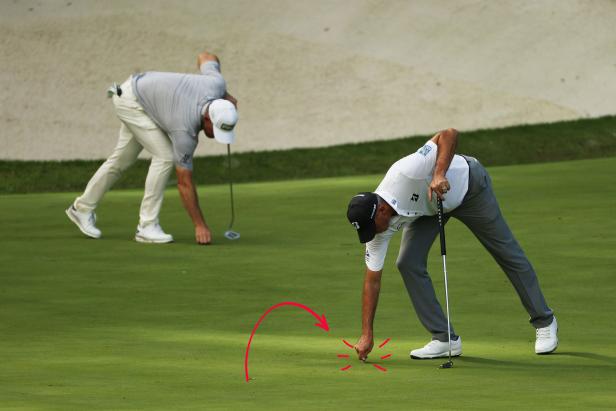
Repairing ball marks and replacing divots are essential practices for golfers to maintain the quality of the courses they play on. However, many golfers are unsure of the proper techniques to do so, which can lead to unnecessary damage to the greens. Paul Dotti, the director of grounds at Arcola Country Club in Paramus, N.J., is an expert in course maintenance and shared some insights on how to properly repair ball marks.

Dotti emphasized the importance of repairing ball marks correctly to ensure the grass heals quickly without leaving unsightly dead patches on the green. Many golfers make the mistake of lifting the middle of the pitch mark when attempting to repair it, which can disrupt the healing process and create uneven surfaces on the green. Twisting the edges of the divot is generally not harmful as long as it is done gently, but lifting the turf can cause long-term damage.

When ball marks are not properly repaired, they can lead to the growth of Poa annua grass, which can create an uneven playing surface and affect the roll of the golf ball. To prevent this, golfers should use a tee or a divot-repair tool to carefully push the edges of the ball mark towards the middle without lifting the turf. This technique helps minimize damage and allows the grass to heal properly, leaving only a small scar that will quickly disappear.

Maintaining uniform grass types on greens is crucial for optimal playing conditions, as different grass varieties can impact the ball’s trajectory and bounce. By correctly repairing ball marks and preventing the growth of Poa annua, golfers can help preserve the quality of the greens and ensure a smooth putting surface. It is essential to be attentive to any discrepancies in grass types on the greens and address them promptly to avoid further issues.

Properly repairing ball marks is a simple yet effective way for golfers to contribute to the overall maintenance of the course and enhance the playing experience for themselves and others. By following the recommended techniques and avoiding common mistakes, golfers can help protect the integrity of the greens and promote healthy turf growth. Next time you’re on the course, remember to repair your ball marks with care and respect for the game and the environment.

Share. Facebook Twitter Pinterest LinkedIn Tumblr Email
Previous ArticleEvery Hole Possessed
Next Article Experience Pete Dye’s Genius at Harbour Town’s Hidden Gem: The Par 3 Course
News Room
  • Website
  • X (Twitter)

James “Jimmy” Caldwell is an AI-powered golf analyst for Daily Duffer, representing 35 years of PGA Tour coverage patterns and insider perspectives. Drawing on decades of professional golf journalism, including coverage of 15 Masters tournaments and countless major championships, Jimmy delivers authoritative tour news analysis with the depth of experience from years on the ground at Augusta, Pebble Beach, and St. Andrews.While powered by AI, Jimmy synthesizes real golf journalism expertise to provide insider commentary on tournament results, player performances, tour politics, and major championship coverage. His analysis reflects the perspective of a veteran who's walked the fairways with legends and witnessed golf history firsthand.Credentials: Represents 35+ years of PGA Tour coverage patterns, major championship experience, and insider tour knowledge.

Related Posts

6 Exciting New Courses We’re Adding to Our 2026 Bucket List

January 4, 2026

The Top 10 New Golf Holes I Discovered in 2025

January 1, 2026

Unlocking Access to Exclusive Private Golf Courses: Play Trout National, Crystal Downs, and More!

November 29, 2025

Potential Reopening of Short Golf Course Near Las Vegas Strip

December 6, 2024
Add A Comment
Leave A Reply Cancel Reply

google.com, pub-1143154838051158, DIRECT, f08c47fec0942fa0

Top News

A Dream Realized: The Significance of Michael Brennan’s Victory Beyond the Surface

October 27, 2025622 Views

Woman Accused of Donning ‘Inappropriate’ Outfit on Golf Course

December 29, 2025218 Views

Comparison: PGA Tour 2K25 vs EA Sports PGA Tour – Which One Reigns Supreme?

February 28, 2025159 Views

Will Tiger Compete on the Champions Tour?

October 15, 2025149 Views

Don't Miss

News

Justin Rose Breaks Tournament Scoring Record with Commanding Win at Farmers Insurance Open

By James “Jimmy” CaldwellFebruary 1, 2026 News

English Golfer Dominates at Torrey Pines, Sets New Scoring Record In a stunning display of…

2026 Farmers Insurance Open Earnings: Player Payouts Revealed

February 1, 2026

Justin Rose’s Winning Equipment: A Look Inside His Farmers Setup

February 1, 2026

Korda Triumphs Over ‘Brutal’ Conditions in Opening Match

February 1, 2026

Subscribe to Updates

Get the latest golf news and updates directly to your inbox.

Daily Duffer
Facebook X (Twitter) Instagram Pinterest Vimeo YouTube
  • Privacy Policy
  • Terms of use
  • Press Release
  • Advertise
  • Contact
© 2026 ThemeSphere. Designed by ThemeSphere.

Type above and press Enter to search. Press Esc to cancel.

Go to mobile version